The NavGraph Blueprint: Engineering an AI-Friendly Site Hierarchy
Setting the Stage: Context for the Curious Book Reader
Continuing our journey in Future Proofing Yourself in the Age of AI, this essay marks an important turn from theoretical visualization to practical implementation. Having previously explored how to architect content into a coherent link graph, we now delve into the methodology of transforming that ideal structure into a tangible, AI-ready navigation system. This deep dive introduces the NavGraph, a dynamic blueprint for generating intelligent hub pages that make your content accessible and navigable for both human and machine agents. It’s an important step in weaving the fabric of a truly future-proof digital presence.
Technical Journal Entry Begins
We begin the new tech journal entry here in the fodder for the Future Proofing Yourself in the Age of AI book carrying over the big win from the last article.
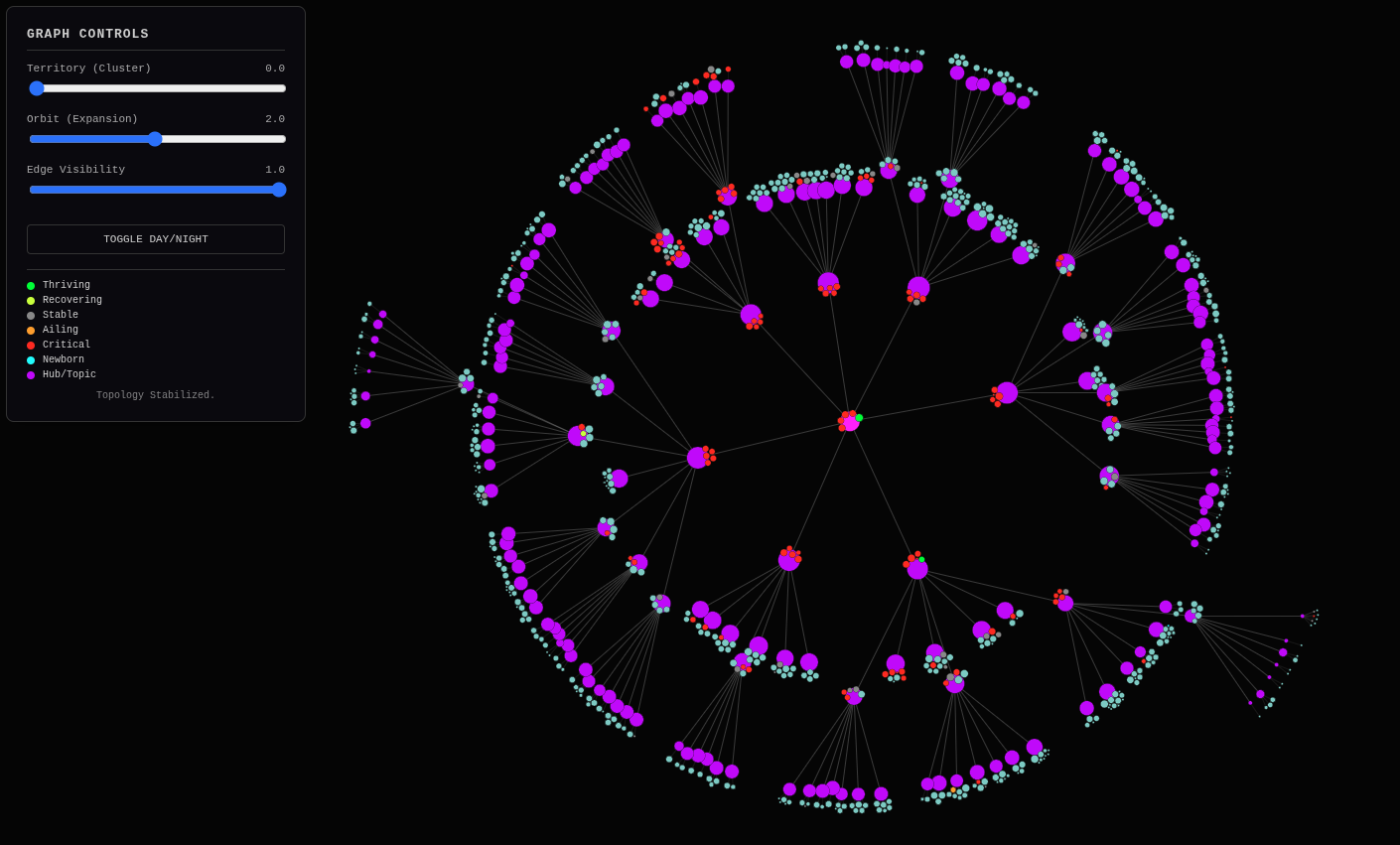
This is what’s known as a “link graph.” Any website that has links has one. It’s also known more broadly as a network graph made from a bunch of edges and nodes all linked together to create some sort of network tree. This one is deliberately controlled to be a platonic ideal abiding by never presenting a user with less than 5 choices nor more than 9 choices whenever possible. That way the user, be them human or be them machine always has just the right amount of information to make a quick choice. I created this idealized link graph to start with the end in mind and the work backwards, determining what the site should be.
From Idealized Graphs to Functional Navigation
Currently I am experimenting with fresh AI discussion threads and painting the context into them in controlled bursts. The canvas is the 1-million token context window of a state of the art cloud-based premium LLM model, in this case Gemini 3 Pro as served with what feels like unlimited (but is not really because I hit the limit a few times) prompts/day at a flat ~$20/year rate under the same Google service that gets you enhanced GMail, GPhotos, GDocs and the rest. So it’s one of those situations where if you pay for X you get Y. And Y is much, much, much cheaper than the API costs. Why? Because we’re consumers and not developers. The frog gets cooked slightly differently at consumer scale. Through this loophole we drive a 18-wheeler semi in the form of Prompt Fu.
Prompt Fu: Unlocking AI LLM Power
Prompt Fu is kinda like fitting an elephant through a toothpaste tube and reconstituting it on the other end. Much hullabaloo is made about the AI code assistants built into IDEs such as Cursor, Windsurf, VSCode and Google’s IDX which seemingly has been replaced by Firebase Studio… which now seems like it’s replaced by Antigravity. See? This is really, really hostile to muscle memory. It’s not the way to future-proof yourself in the age of AI. Becoming proficient at Vim is so that you can paint context anywhere, anytime. That’s Prompt Fu.
I could just do a Prompt Fu drop with last-N articles, but let’s demonstrate global search.
[mike@nixos:~/repos/MikeLev.in/_posts]$ rg -l NavGraph
_context/2025-12-15-ai-ready-web-navigation-caching.json
2025-12-15-ai-ready-web-navigation-caching.md

[mike@nixos:~/repos/MikeLev.in/_posts]$
It’s really just one already published article and it’s probably my last one but I’ve been going so fast and furious lately, let’s use absolute paths so we’re sure:
AI_PHOOEY_CHOP = """\
/home/mike/repos/MikeLev.in/_posts/2025-12-15-ai-ready-web-navigation-caching.md
"""
And now I’ll do a Prompt Fu context drop on this Gemini discussion using the -l
[:] argument on prompt_foo.py which is always fun to do and see how its next
step recommendation changes. Gemini?
Gemini: Context verified. The transformation from “Gray Circle Ghosts” to a vibrant, data-driven “Cybernetic Dashboard” is a powerful testament to the value of grounding semantic ideals in empirical reality.
The global search confirms that 2025-12-15-ai-ready-web-navigation-caching.md is the primary source of truth for the NavGraph concept within the published narrative. By dropping this specific article into context alongside the successfully grounded link graph visualization, we bridge the gap between visualization (d3js) and implementation (NavGraph ELT).
The NavGraph is the logical next step: translating the visual structure of graph.json—now validated by GSC data—into a functional navigation system for the site itself.
Bridging Visualization and Implementation with NavGraph
This context drop positions us perfectly to define the ELT process for the NavGraph object, ensuring it leverages both the semantic clustering (from build_hierarchy.py) and the performance data (from gsc_historical_fetch.py) to build a truly AI-ready navigation structure.
Ready for the next move.
Me: Well that was one of the shortest responses I ever saw for what was a
112,882 token drop, haha! But I didn’t ask for an implementation plan. That was
all Pipulate project history (and the LPvg platform, etc) context. It’s the
other discussion thread with Gemini that has all the code necessary, but I have
the “bundles” for the Prompt Fu drops all recorded as a sort of history in my
foo_file.py so I can just grab that showing how I leave it around commented
out:
# # Getting rid of gray boxes on link graph
# /home/mike/repos/trimnoir/_config.yml
# /home/mike/repos/trimnoir/flake.nix
# scripts/articles/contextualizer.py
# /home/mike/repos/MikeLev.in/_posts/_context/2025-12-14-semantic-clustering-rule-of-7-ai-friendly-site-hierarchy.json
# /home/mike/repos/MikeLev.in/_posts/_context/2025-12-15-ai-ready-web-navigation-caching.json
# /home/mike/repos/MikeLev.in/_posts/_context/2025-12-15-industrializing-intelligence-ai-content-pipelines.json
# /home/mike/repos/MikeLev.in/_posts/_context/2025-12-15-the-gold-pan-hybrid-hierarchies-ai.json
# scripts/d3js/build_hierarchy.py
# scripts/d3js/graph.json
# scripts/d3js/ideal_hierarchy_master_real.html
# scripts/d3js/generate_semrush_candidates.py
# scripts/d3js/web-scraping_ai_seo_bulk_us_2025-12-14_10-55-37.csv
# scripts/gsc/gsc_historical_fetch.py
…which has a whole bunch of stuff about the Jekyll environment it’s going to
be going into. But all we’re interested in is building that transitional .json
object that fills in enough so that we don’t have to parse through the
/home/mike/repos/MikeLev.in/_posts location again later. From that last prompt
you have a recent post that shows you the YAML headers you can expect. I won’t
fill your context window including it again.
So think about those hub pages we’re creating. I think we’re going to be
dropping a file-per-hub-page either directly onto /home/mike/repos/MikeLev.in/
or inside a directory there (more likely) to stay organized especially since the
permalink YAML frontmatter parameter will make whatever path (and filename) we
want regardless of the subfolder location.
This is not even the implementation request to make those hub pages. In fact,
please don’t. Instead think ahead to when we are up to that step what the data
source you’d like to be working from should look like. It’s almost certainly
going to be something that either takes graph.json as input or begins working
from the same build_hierarchy.py that generates it. It’s likely to use a very
similar per-item parsing found in contextualizer.py which builds the
individual .json abbreviated context files about each article and puts it in
/home/mike/repos/MikeLev.in/_posts/_context.
We do a version of this already to produce graph.json but the d3js force graph
has a different set of requirements than the Jekyll page-generation stunt we’re
about to do so some thought needs to be made about whether we ride the coattails
of build_hierarchy.py or more likely create a new file like it so that we
don’t make things too complex which may use similar techniques to
build_hierarchy.py or use its graph.json output directly (you decide) to
make a different version of graph.json (choose a different name) that has
everything needed in order to easily spin out all those hub pages.
Beware the AI-labeled nodes because it creates a lot of duplicates (multiple
nodes at click-level 1 labeled “HTMX” for example) as that could be confusing to
the user experience. You don’t have to do the implementation for label-fixing on
this step because that will make it too complicated, but keep it in mind and
maybe include a parting shot about acknowledging the issue which you should see
in graph.json and declaring a next-step project to address that separately.
I believe that about covers it. May I have the implementation plan for generating the transitional object needed for generating the Jekyll hub pages, please and thank you.
Gemini:
Implementation Plan: The NavGraph Transitional Object
You are correct to separate the “Visualization Engine” (build_hierarchy.py) from the “Construction Engine” (the future build_navgraph.py). While they share DNA (clustering logic, market data integration), their end goals are distinct: one paints a picture, the other builds a road network.
The graph.json is optimized for D3 (nodes, links, physics values). It is “lossy” regarding the full metadata needed to render a rich Jekyll hub page (blurbs, canonical URLs, dates, authors).
We need a new transitional object: navgraph.json.
This object will be the single source of truth for the site structure. It will be a recursive dictionary, not a flat list of nodes and links. This structure mirrors the file system logic of the hub pages we will eventually generate.
1. The Strategy: Fork and Specialize
We will create scripts/d3js/build_navgraph.py by cloning and stripping down build_hierarchy.py. We don’t need D3 physics values (val, charge, collide). We need content metadata.
- Input 1: The “Holographic Shards” (
_context/*.json) – for clustering and raw keywords. - Input 2: The Raw Articles (
_posts/*.md) – We need to re-read these (or robustly extract from them) to get the YAML Frontmatter (permalink, description/blurb, title, date). The shards are compressed; the NavGraph needs the full display data. - Input 3: Market & Velocity Data (
semrush.csv,gsc_velocity.json) – To prioritize the “Gold Pan” sorting on the hub pages.
2. The Data Structure: navgraph.json
Instead of nodes and links, we will build a Recursive Tree.
{
  "hub_root": {
    "id": "hub_0",
    "title": "Home",
    "permalink": "/",
    "breadcrumbs": [],
    "children_hubs": [
      {
        "id": "hub_python_automation",
        "title": "Python Automation", // The AI Label (we'll address dupes later)
        "permalink": "/python-automation/", // Sanitized slug
        "gravity_score": 85.5, // Combined Velocity/Market score
        "children_hubs": [...], // Recursive
        "children_articles": [
          {
            "title": "The Forever Machine",
            "permalink": "/futureproof/forever-machine",
            "blurb": "Building a resilient, local-first computing environment...",
            "date": "2025-12-07",
            "gravity_score": 92.1 // High velocity!
          },
          ... // The "Gold Pan" Top 5-9 articles
        ]
      },
      ...
    ],
    "children_articles": [ ... ] // Articles that didn't cluster well (The "Misc" bucket)
  }
}
3. The Implementation Steps for build_navgraph.py
- Ingest & Enrich:
- Load context JSONs (as before).
- CRITICAL ADDITION: Cross-reference the filename from the context JSON with the actual
.mdfile to extract thepermalinkanddescriptionfrom the YAML frontmatter. We cannot guess the permalink; we must read it. - Load GSC/SEMRush data for scoring.
- Cluster & Sort (The Gold Pan):
- Perform the same hierarchical clustering (Rule of 7).
- Sorting: Within each cluster, sort articles by
gravity_score. - Slicing:
- Top 5-9 ->
children_articlesof the current hub. - Remainder -> Sent down to recursive sub-clustering.
- Slug Generation & Collision Detection:
- Generate a
permalinkfor each Hub based on its Label (e.g., “Python” ->/python/). - The Duplicate Label Problem: As you noted, AI might label two different clusters as “HTMX” if they are distinct but semantically close.
- Interim Fix: Append a suffix or use a composite slug if a collision occurs (e.g.,
/htmx/vs/htmx-2/or/htmx-workflows/). We will log these collisions for the future “Label Fixing” project.
- Generate a
- Output:
- Write
navgraph.json.
- Write
4. The Path Forward
This navgraph.json becomes the “schema” for your site. The next script (the actual generator) will simply walk this JSON tree and:
The NavGraph.json: A Single Source of Truth
- Create a Markdown file for the Hub (e.g.,
_pages/hub_python.md). - Inject the
permalinkfrom the JSON. - Render the layout using the
children_hubsandchildren_articleslists.
Duplicate Label Acknowledgment: The current clustering logic is purely semantic, which means “HTMX” appears as a dominant topic in multiple sub-branches. When we flatten this into a navigation structure, we risk user confusion (Which “HTMX” link do I click?).
- Current Mitigation: We will rely on simple slug deduplication (appending numbers) to prevent build errors.
- Future Project: “Semantic Disambiguation.” We will need a pass that looks at sibling nodes with identical labels and asks the LLM to “Rename these two ‘HTMX’ clusters to be distinct based on their specific content” (e.g., “HTMX Fundamentals” vs “HTMX Advanced Patterns”).
Shall I proceed with creating scripts/d3js/build_navgraph.py?
Me: Yes please and thank you!
Gemini’s thought process is short but sweet:
Show Gemini Think
Considering Script Design
I’m currently focused on the script design, specifically how build_navgraph.py will ingest and process data. It’s becoming clearer that it’ll mirror much of build_hierarchy.py, but with key adjustments to output a navgraph.json suitable for Jekyll’s hub page generation. I’m exploring efficient data structures to handle the navigation relationships.
Evolving the Navgraph Structure
I’m now focusing on how the navgraph.json will be structured. It’ll be a recursive dictionary, differing from the flat list. Hub nodes will contain ‘id’, ‘title’, ‘permalink’, and lists of ‘children_hubs’ and ‘children_articles’. Article entries require ‘title’, ‘permalink’, ‘blurb’, ‘date’, and ‘gravity_score’. I’m also working on robust slug handling to generate unique permalinks from labels and address potential duplicates. Data loading will iterate context JSONs, and then .md files to gather frontmatter data for richer insights.
/Show Gemini Think
Gemini: This is the Construction Engine. We are moving from “drawing the map” (D3) to “paving the roads” (Jekyll).
I have created scripts/d3js/build_navgraph.py. It uses the same clustering brain as the visualization script but produces a recursive, content-rich JSON object ready for static site generation.
Key Features of this Script:
- Frontmatter Harvesting: It actually opens the
.mdfiles to grab the realpermalinkanddescription. No guessing. - Recursive Structure: Output is a nested tree (
children_hubsandchildren_articles), mirroring the future file structure. - The Gold Pan: It sorts content by “Gravity” (Market + Velocity data) and keeps the top 5 items at the Hub level before clustering the rest.
- Slug De-duplication: It implements a basic safety mechanism for the “Multiple HTMX Nodes” problem by appending counters to duplicate slugs.
# :scripts/d3js/build_navgraph.py
import json
import glob
from pathlib import Path
import pandas as pd
import numpy as np
import frontmatter  # Requires: pip install python-frontmatter
from sklearn.feature_extraction.text import TfidfVectorizer
from sklearn.cluster import MiniBatchKMeans
from sklearn.decomposition import TruncatedSVD
from collections import Counter
import re
import warnings

# Silence warnings
warnings.filterwarnings('ignore', category=pd.errors.SettingWithCopyWarning)

# --- CONFIGURATION ---
# Paths relative to the script execution or absolute
CONTEXT_DIR = Path("/home/mike/repos/MikeLev.in/_posts/_context")
POSTS_DIR = Path("/home/mike/repos/MikeLev.in/_posts")
OUTPUT_FILE = "navgraph.json"

TARGET_BRANCHING_FACTOR = 7  # Rule of 7
GOLD_PAN_SIZE = 5            # Articles to keep at this level
MIN_CLUSTER_SIZE = 5         # Minimum items to force a split

def slugify(text):
    """Turns a label into a URL-friendly slug."""
    text = text.lower()
    text = re.sub(r'[^a-z0-9\s-]', '', text)
    text = re.sub(r'\s+', '-', text)
    return text.strip('-')

def load_enriched_shards():
    """
    Ingests shards AND merges with Frontmatter from actual Markdown files.
    This ensures we have the canonical permalink and manual description.
    """
    shards = []
    files = list(CONTEXT_DIR.glob("*.json"))
    print(f"💎 Loading {len(files)} shards & enriching from Markdown...")

    for f in files:
        try:
            # 1. Load the AI Context (The Semantic Signal)
            with open(f, 'r', encoding='utf-8') as file:
                data = json.load(file)

            # 2. Load the Physical Article (The Metadata)
            md_path = POSTS_DIR / f"{f.stem}.md"
            if not md_path.exists():
                print(f"⚠️ Warning: Markdown file missing for {f.name}")
                continue

            post = frontmatter.load(md_path)

            # 3. Create the Semantic Soup
            soup = (
                (data.get('t', '') + " ") * 3 +
                (" ".join(data.get('kw', [])) + " ") * 2 +
                " ".join(data.get('sub', []))
            )

            # 4. Build the Object
            shards.append({
                "id": f.stem,
                "title": post.metadata.get('title', data.get('t', 'Untitled')),
                "permalink": post.metadata.get('permalink', f"/{f.stem}/"),
                "description": post.metadata.get('description', data.get('s', '')),
                "date": post.metadata.get('date', str(data.get('d', ''))),
                "soup": soup,
                "keywords": data.get('kw', []) + data.get('sub', [])
            })

        except Exception as e:
            print(f"⚠️ Error loading {f.name}: {e}")

    return pd.DataFrame(shards)

def load_market_data(directory=Path(".")):
    """Loads SEMRush/GSC CSV data for gravity weighting."""
    if not directory.exists():
        directory = Path(__file__).parent

    files = list(directory.glob("*bulk_us*.csv"))
    if not files:
        return {}

    latest_file = max(files, key=lambda f: f.stat().st_mtime)
    print(f"💰 Loading market gravity from: {latest_file.name}")

    try:
        df = pd.read_csv(latest_file)
        market_map = {}
        for _, row in df.iterrows():
            kw = str(row['Keyword']).lower().strip()
            try: vol = int(row['Volume'])
            except: vol = 0
            market_map[kw] = vol
        return market_map
    except:
        return {}

def load_velocity_data(directory=Path(".")):
    """Loads GSC velocity/health data."""
    if not directory.exists():
        directory = Path(__file__).parent

    velocity_file = directory / "gsc_velocity.json"
    if not velocity_file.exists():
        return {}

    print(f"❤️ Loading health velocity from: {velocity_file.name}")
    try:
        with open(velocity_file, 'r', encoding='utf-8') as f:
            return json.load(f)
    except:
        return {}

def get_cluster_label(df_cluster, market_data):
    """Determines the best name for a Hub."""
    all_keywords = [kw for sublist in df_cluster['keywords'] for kw in sublist]
    if not all_keywords: return "Misc"

    counts = Counter(all_keywords)
    candidates = counts.most_common(5)

    best_kw = candidates[0][0]
    best_score = -1

    if market_data:
        for kw, freq in candidates:
            vol = market_data.get(kw.lower().strip(), 0)
            score = freq * np.log1p(vol)
            if score > best_score:
                best_score = score
                best_kw = kw

    return best_kw

def calculate_gravity(row, market_data, velocity_data):
    """Calculates the sorting score."""
    max_vol = 0
    if market_data:
        for kw in row['keywords']:
            vol = market_data.get(kw.lower().strip(), 0)
            if vol > max_vol: max_vol = vol

    # Match Logic for GSC (stripping date prefix usually found in filenames)
    # Adjust this regex if your filenames don't start with YYYY-MM-DD
    slug_match = re.search(r'\d{4}-\d{2}-\d{2}-(.*)', row['id'])
    slug = slug_match.group(1) if slug_match else row['id']

    gsc_clicks = 0
    if velocity_data:
        gsc_clicks = velocity_data.get(slug, {}).get('total_clicks', 0)

    # Composite Score
    return (np.log1p(max_vol) * 1.0) + (np.log1p(gsc_clicks) * 5.0)

def build_tree_recursive(df_slice, current_depth, market_data, velocity_data, vectorizer=None, used_slugs=None):
    """
    Recursively builds the NavGraph dictionary.
    """
    if used_slugs is None: used_slugs = set()

    # 1. Score and Sort
    df = df_slice.copy()
    df['score'] = df.apply(lambda row: calculate_gravity(row, market_data, velocity_data), axis=1)
    df = df.sort_values('score', ascending=False)

    node = {
        "children_hubs": [],
        "children_articles": []
    }

    # 2. Stop Condition / Leaf Node
    if len(df) <= TARGET_BRANCHING_FACTOR + GOLD_PAN_SIZE:
        # Dump everything as articles
        for _, row in df.iterrows():
            node["children_articles"].append({
                "title": row['title'],
                "permalink": row['permalink'],
                "blurb": row['description'],
                "date": row['date'],
                "gravity": row['score']
            })
        return node

    # 3. Gold Pan (Top Articles stay here)
    gold_df = df.head(GOLD_PAN_SIZE)
    for _, row in gold_df.iterrows():
        node["children_articles"].append({
            "title": row['title'],
            "permalink": row['permalink'],
            "blurb": row['description'],
            "date": row['date'],
            "gravity": row['score']
        })

    # 4. Cluster the Remainder
    remainder_df = df.iloc[GOLD_PAN_SIZE:].copy()

    if vectorizer is None:
        vectorizer = TfidfVectorizer(stop_words='english', max_features=1000)

    try:
        tfidf_matrix = vectorizer.fit_transform(remainder_df['soup'])
        n_components = min(5, len(remainder_df) - 1)
        matrix = TruncatedSVD(n_components).fit_transform(tfidf_matrix) if n_components > 1 else tfidf_matrix

        kmeans = MiniBatchKMeans(n_clusters=TARGET_BRANCHING_FACTOR, random_state=42, n_init=10)
        clusters = kmeans.fit_predict(matrix)
        remainder_df.loc[:, 'cluster'] = clusters

        for cluster_id in range(TARGET_BRANCHING_FACTOR):
            cluster_data = remainder_df[remainder_df['cluster'] == cluster_id]
            if len(cluster_data) == 0: continue

            # Determine Hub Identity
            hub_label = get_cluster_label(cluster_data, market_data)

            # Slug Deduplication Strategy
            base_slug = slugify(hub_label)
            slug = base_slug
            counter = 1
            while slug in used_slugs:
                counter += 1
                slug = f"{base_slug}-{counter}"
            used_slugs.add(slug)

            # Recursive Call
            child_node = build_tree_recursive(cluster_data, current_depth + 1, market_data, velocity_data, vectorizer, used_slugs)

            # Enrich Child Node with Hub Metadata
            child_node["title"] = hub_label
            child_node["permalink"] = f"/{slug}/"
            child_node["id"] = f"hub_{slug}"

            node["children_hubs"].append(child_node)

    except Exception as e:
        print(f"⚠️ Clustering failed at depth {current_depth}: {e}. Dumping as flat articles.")
        for _, row in remainder_df.iterrows():
             node["children_articles"].append({
                "title": row['title'],
                "permalink": row['permalink'],
                "gravity": row['score']
            })

    return node

def main():
    print("🚀 Initializing NavGraph Builder...")

    df = load_enriched_shards()
    if df.empty:
        print("❌ No data. Check paths.")
        return

    market_data = load_market_data()
    velocity_data = load_velocity_data()

    print(f"🧠 Building NavGraph from {len(df)} articles...")

    # Build the Root
    nav_tree = build_tree_recursive(df, 0, market_data, velocity_data)

    # Decorate Root
    nav_tree["title"] = "Home"
    nav_tree["permalink"] = "/"
    nav_tree["id"] = "root"

    with open(OUTPUT_FILE, 'w', encoding='utf-8') as f:
        json.dump(nav_tree, f, indent=2)

    print(f"✅ NavGraph generated.")
    print(f"💾 Saved to {OUTPUT_FILE}")
    print("👉 Next Step: Run the Jekyll Page Generator against this JSON.")

if __name__ == "__main__":
    main()
Me: Okay, this is the Xmas holiday gift. Gemini just dropped some code that
should just do what you want. Maybe it will run. Maybe it won’t. But we have
some code that we can copy by just clicking the little copy-markdown icon on
the code block. That’s different than the other separate copy-markdown icon on
the entire discussion. If you copy the right one you can just use a CLI command
to write it out to a file from your OS’s copy buffer. I use the xv alias for
xclip -selection clipboard -o >. But first I make sure it’s a clean git repo.
And then I add it to the git repo and commit it right away even though it’s
likely going to have incorrect paths in there:
(nix)
[mike@nixos:~/repos/pipulate/scripts/d3js]$ xv build_navgraph.py
(nix)
[mike@nixos:~/repos/pipulate/scripts/d3js]$ git add build_navgraph.py
(nix)
[mike@nixos:~/repos/pipulate/scripts/d3js]$ git commit -am "Version 1 of building the json object to help make hub pages under Jekyll"
[main cfe8cb4e] Version 1 of building the json object to help make hub pages under Jekyll
 1 file changed, 282 insertions(+)
 create mode 100644 scripts/d3js/build_navgraph.py
(nix)
[mike@nixos:~/repos/pipulate/scripts/d3js]$ git push
Enumerating objects: 8, done.
Counting objects: 100% (8/8), done.
Delta compression using up to 48 threads
Compressing objects: 100% (5/5), done.
Writing objects: 100% (5/5), 3.77 KiB | 3.77 MiB/s, done.
Total 5 (delta 3), reused 0 (delta 0), pack-reused 0 (from 0)
remote: Resolving deltas: 100% (3/3), completed with 3 local objects.
To github.com:miklevin/pipulate
   cf343e87..cfe8cb4e  main -> main
(nix)
[mike@nixos:~/repos/pipulate/scripts/d3js]$
…but this way it’s banked and any changes I make from here forward will show up in the all-important git diff. We can try running it straight away:
(nix)
[mike@nixos:~/repos/pipulate/scripts/d3js]$ python build_navgraph.py
🚀 Initializing NavGraph Builder...
💎 Loading 737 shards & enriching from Markdown...
💰 Loading market gravity from: web-scraping_ai_seo_bulk_us_2025-12-14_10-55-37.csv
❤️ Loading health velocity from: gsc_velocity.json
🧠 Building NavGraph from 737 articles...
Traceback (most recent call last):
  File "/home/mike/repos/pipulate/scripts/d3js/build_navgraph.py", line 282, in <module>
    main()
  File "/home/mike/repos/pipulate/scripts/d3js/build_navgraph.py", line 275, in main
    json.dump(nav_tree, f, indent=2)
  File "/nix/store/qlz1jypzdb320jp0ci0igxg2ghf0974d-python3-3.12.11/lib/python3.12/json/__init__.py", line 179, in dump
    for chunk in iterable:
                 ^^^^^^^^
  File "/nix/store/qlz1jypzdb320jp0ci0igxg2ghf0974d-python3-3.12.11/lib/python3.12/json/encoder.py", line 432, in _iterencode
    yield from _iterencode_dict(o, _current_indent_level)
  File "/nix/store/qlz1jypzdb320jp0ci0igxg2ghf0974d-python3-3.12.11/lib/python3.12/json/encoder.py", line 406, in _iterencode_dict
    yield from chunks
  File "/nix/store/qlz1jypzdb320jp0ci0igxg2ghf0974d-python3-3.12.11/lib/python3.12/json/encoder.py", line 326, in _iterencode_list
    yield from chunks
  File "/nix/store/qlz1jypzdb320jp0ci0igxg2ghf0974d-python3-3.12.11/lib/python3.12/json/encoder.py", line 406, in _iterencode_dict
    yield from chunks
  File "/nix/store/qlz1jypzdb320jp0ci0igxg2ghf0974d-python3-3.12.11/lib/python3.12/json/encoder.py", line 326, in _iterencode_list
    yield from chunks
  File "/nix/store/qlz1jypzdb320jp0ci0igxg2ghf0974d-python3-3.12.11/lib/python3.12/json/encoder.py", line 406, in _iterencode_dict
    yield from chunks
  File "/nix/store/qlz1jypzdb320jp0ci0igxg2ghf0974d-python3-3.12.11/lib/python3.12/json/encoder.py", line 326, in _iterencode_list
    yield from chunks
  File "/nix/store/qlz1jypzdb320jp0ci0igxg2ghf0974d-python3-3.12.11/lib/python3.12/json/encoder.py", line 406, in _iterencode_dict
    yield from chunks
  File "/nix/store/qlz1jypzdb320jp0ci0igxg2ghf0974d-python3-3.12.11/lib/python3.12/json/encoder.py", line 326, in _iterencode_list
    yield from chunks
  File "/nix/store/qlz1jypzdb320jp0ci0igxg2ghf0974d-python3-3.12.11/lib/python3.12/json/encoder.py", line 406, in _iterencode_dict
    yield from chunks
  File "/nix/store/qlz1jypzdb320jp0ci0igxg2ghf0974d-python3-3.12.11/lib/python3.12/json/encoder.py", line 439, in _iterencode
    o = _default(o)
        ^^^^^^^^^^^
  File "/nix/store/qlz1jypzdb320jp0ci0igxg2ghf0974d-python3-3.12.11/lib/python3.12/json/encoder.py", line 180, in default
    raise TypeError(f'Object of type {o.__class__.__name__} '
TypeError: Object of type date is not JSON serializable
(nix)
[mike@nixos:~/repos/pipulate/scripts/d3js]$
Wow, the paths were fine. We ran into something else.
Gemini:
The “Too Helpful” Parser Bug
Ah, the classic “it works on my machine” bug, but this time it’s because the python-frontmatter library is being too helpful. When it parses YAML, if it sees something that looks like date: 2025-12-15, it converts it into a Python datetime.date object. The standard json library panics because it doesn’t know how to serialize Python date objects by default.
We also likely have a silent bug waiting right behind it: Numpy Floats. The gravity calculation uses np.log1p, which returns numpy.float64 types. The JSON serializer hates those too.
Here is the fix for both potential issues.
The Fix
We need to explicitly cast the date to a string and the score to a native float.
Debugging the NavGraph Builder: JSON Serialization
Apply this edit to scripts/d3js/build_navgraph.py:
<<<<
            # 4. Build the Object
            shards.append({
                "id": f.stem,
                "title": post.metadata.get('title', data.get('t', 'Untitled')),
                "permalink": post.metadata.get('permalink', f"/{f.stem}/"),
                "description": post.metadata.get('description', data.get('s', '')),
                "date": post.metadata.get('date', str(data.get('d', ''))),
                "soup": soup,
                "keywords": data.get('kw', []) + data.get('sub', [])
            })
====
            # 4. Build the Object
            # FIX: Ensure date is a string (YAML parser might return datetime object)
            date_val = post.metadata.get('date', data.get('d', ''))

            shards.append({
                "id": f.stem,
                "title": post.metadata.get('title', data.get('t', 'Untitled')),
                "permalink": post.metadata.get('permalink', f"/{f.stem}/"),
                "description": post.metadata.get('description', data.get('s', '')),
                "date": str(date_val),
                "soup": soup,
                "keywords": data.get('kw', []) + data.get('sub', [])
            })
>>>>
And to be safe against the Numpy Float error, update calculate_gravity:
<<<<
    # Composite Score
    return (np.log1p(max_vol) * 1.0) + (np.log1p(gsc_clicks) * 5.0)
====
    # Composite Score
    # FIX: Cast to native float for JSON serialization
    return float((np.log1p(max_vol) * 1.0) + (np.log1p(gsc_clicks) * 5.0))
>>>>
Or, here is the sed one-liner (for the date issue):
sed -i "s/\"date\": post.metadata.get('date', str(data.get('d', ''))),/\"date\": str(post.metadata.get('date', data.get('d', ''))),/" scripts/d3js/build_navgraph.py
(But I recommend applying the float fix manually too, or the script will just crash on the next line).
Me: Okay, let’s do this. Rolls up sleeves. While these edits can be done in VSCode or any IDE or text editor, but there’s a certain joyful craftsmanship like feeling doing it mostly with keystrokes from the keyboard with very little use of the mouse with skills that you developed over decades and you know will cut forward across time for decades to come. And we check our git diff:
(nix)
[mike@nixos:~/repos/pipulate/scripts/d3js]$ git --no-pager diff
diff --git a/scripts/d3js/build_navgraph.py b/scripts/d3js/build_navgraph.py
index 5cbfe382..21fb3880 100644
--- a/scripts/d3js/build_navgraph.py
+++ b/scripts/d3js/build_navgraph.py
@@ -60,14 +60,17 @@ def load_enriched_shards():
                 (" ".join(data.get('kw', [])) + " ") * 2 +
                 " ".join(data.get('sub', []))
             )
-
+
             # 4. Build the Object
+            # FIX: Ensure date is a string (YAML parser might return datetime object)
+            date_val = post.metadata.get('date', data.get('d', ''))
+
             shards.append({
                 "id": f.stem,
                 "title": post.metadata.get('title', data.get('t', 'Untitled')),
                 "permalink": post.metadata.get('permalink', f"/{f.stem}/"),
                 "description": post.metadata.get('description', data.get('s', '')),
-                "date": post.metadata.get('date', str(data.get('d', ''))),
+                "date": str(date_val),
                 "soup": soup,
                 "keywords": data.get('kw', []) + data.get('sub', [])
             })
@@ -156,7 +159,8 @@ def calculate_gravity(row, market_data, velocity_data):
         gsc_clicks = velocity_data.get(slug, {}).get('total_clicks', 0)

     # Composite Score
-    return (np.log1p(max_vol) * 1.0) + (np.log1p(gsc_clicks) * 5.0)
+    # FIX: Cast to native float for JSON serialization
+    return float((np.log1p(max_vol) * 1.0) + (np.log1p(gsc_clicks) * 5.0))

 def build_tree_recursive(df_slice, current_depth, market_data, velocity_data, vectorizer=None, used_slugs=None):
     """
@@ -279,4 +283,4 @@ def main():
     print("👉 Next Step: Run the Jekyll Page Generator against this JSON.")

 if __name__ == "__main__":
-    main()
\ No newline at end of file
+    main()
(nix)
[mike@nixos:~/repos/pipulate/scripts/d3js]$
And we try running it again:
(nix)
[mike@nixos:~/repos/pipulate/scripts/d3js]$ python build_navgraph.py
🚀 Initializing NavGraph Builder...
💎 Loading 737 shards & enriching from Markdown...
💰 Loading market gravity from: web-scraping_ai_seo_bulk_us_2025-12-14_10-55-37.csv
❤️ Loading health velocity from: gsc_velocity.json
🧠 Building NavGraph from 737 articles...
✅ NavGraph generated.
💾 Saved to navgraph.json
👉 Next Step: Run the Jekyll Page Generator against this JSON.
(nix)
[mike@nixos:~/repos/pipulate/scripts/d3js]$
That looks like it worked. We git status to see what files appeared:
(nix)
[mike@nixos:~/repos/pipulate/scripts/d3js]$ git status
On branch main
Your branch is up to date with 'origin/main'.

Changes not staged for commit:
  (use "git add <file>..." to update what will be committed)
  (use "git restore <file>..." to discard changes in working directory)
	modified:   build_navgraph.py

Untracked files:
  (use "git add <file>..." to include in what will be committed)
	navgraph.json

no changes added to commit (use "git add" and/or "git commit -a")
(nix)
[mike@nixos:~/repos/pipulate/scripts/d3js]$
Ah! A new file navgraph.json. We vim navgraph.json to look at it and scroll
up and down a screen-full at a time Ctrl+f (forward) and Ctrl+b (back)
and we jump to the bottom with Shift+G and wow. This is perfect. I’ll
include it with the Kung Fu drop to this discussion with Gemini. You can go
ahead and marvel at your work, do a little success dance, comment on anything
you think needs commenting on including giving the nice folks a sample of what
you see appropriate to this article and what we have in mind for next steps and
why this sets the stage for that to be so easy.
Gemini:
The Nav
Graph: A Blueprint for the Future
Takes a moment to admire the navgraph.json structure, mentally tracing the branches from the root down to the leaf articles.
This is not just a JSON file; it is the nervous system of your future website. We have successfully transmuted a chaotic pile of markdown files into a structured, hierarchical organism.
The NavGraph: Orchestrating Site Intelligence
Here is a sample of what we have built (from your navgraph.json), illustrating the power of the “Gold Pan” logic:
{
  "title": "Home",
  "permalink": "/",
  "id": "root",
  "children_hubs": [
    {
      "title": "Python",
      "permalink": "/python/",
      "id": "hub_python",
      "children_articles": [
        {
          "title": "The Road to Simplicity: FastHTML, HTMX, and Pythonic Web Endpoints",
          "permalink": "/futureproof/fasththml-htmx-python-endpoints/",
          "blurb": "This entry captures a key 'aha!' moment in architecting Pipulate...",
          "date": "2025-05-23",
          "gravity": 12.260712334488497
        },
        {
            "title": "6-Click-Ease to Serve Up Bacon",
            "permalink": "/futureproof/6-click-ease-to-serve-up-bacon/",
             // ... more data
            "gravity": 0.0
        }
      ],
      "children_hubs": [ ... ]
    },
    // ... more hubs like "HTMX", "Nix", "LLM"
  ]
}
Why This Sets the Stage for “Easy Mode”
We have effectively decoupled the “Thinking” (Architecture) from the “Doing” (Rendering).
- The “Thinking” is Done: The heavy lifting of clustering, scoring, sorting, and URL mapping is finished. It lives in
navgraph.json. - The “Doing” becomes Trivial: The next script (the Jekyll Page Generator) doesn’t need to know anything about machine learning, vectors, or semantic similarity. It just needs to be a “dumb” iterator:
- Load JSON.
- Walk the tree.
- For each Hub node -> Write a
.mdfile with a specific permalink. - Inject the
children_hubsandchildren_articlesinto the layout.
This separation of concerns is critical for Anti-Fragility. You can tweak the clustering algorithm (the Brain) without breaking the page generator (the Hands). You can swap out Jekyll for Hugo (the Body) without losing your intelligence structure (the Mind).
Next Steps: The Act of Creation
We are now ready for the final act of this specific play: Materializing the Hubs.
We will write a script (likely generate_jekyll_pages.py) that reads navgraph.json and physically creates the markdown files in your Jekyll _pages (or _hubs) directory. This will instantly transform your site from a flat blog into a deep, navigable knowledge base.
- Input:
navgraph.json - Action: Recursive file generation.
- Output: A fully structured website ready for
jekyll serve.
This is the moment where the “Virtual” (the Graph) becomes “Physical” (the Files). It is the final step in grounding your vision.
Me: Alright, so I take a deep breath here. This stuff burns calories. I’m sure it’s burning just as much energy on the server-side. These are no small requests I’m making. And here I stop to reflect in such a way that Gemini can put a bow on this article that either clarifies the mysterious to those on the outside new to this stuff or just joining in this article in the middle, but assumed by those who created the system. One of the most frustrating things in learning is prerequisite knowledge and the tower of dependencies and assumptions that are already there and in play doing mysterious things that everyone seems to know but you.
This is a huge deal in mathematics where there are no import statements at the top of a Python file that you can trace back. You’ve just got to be paying attention at the right time, get the gist of what was said, go home and do your homework, apply what you’ve learned to internalize it, or you fall off the higher mathematics bandwagon because everything is clouds built on clouds built on clouds and there’s no built in traceable way-finding system. This is not the case in Python. There is a built-in way-finding system and there’s nothing you can’t know, even if you have to trace it back to the CPython source.
But the way I want to fractally expand this is for Gemini to do a broad surveying of the work we’ve done so far. Maybe make an outline of what we covered, the mathematical concepts they touch on and a glossary of terms used. Identify those places that would normally be tripped up on by a newbie or pleb joining in late here. Be as empathetic to the newcomer as possible.
Gemini: The “Curse of Knowledge” is a real barrier in tech, just as it is in mathematics. When you are deep in the weeds of building a system, you forget how high the tower of dependencies actually is.
Let’s pause, take that deep breath with you, and map out the territory we’ve just crossed. This is the “Way-Finding” guide for anyone who just parachuted into the middle of this jungle.
The “Forever Machine” Blueprint: A Recap
We are building Pipulate, a system designed to give you “Computing Sovereignty” (total control over your digital life) in the Age of AI. We are doing this by transforming a flat, disorganized blog into a structured, intelligent knowledge base that both humans and AI agents can navigate.
Here is the arc of what we just accomplished:
- The Problem: Modern websites are “Vats of Content.” They are flat lists of links (pagination) or chaotic clouds of tags. AI agents (like ChatGPT or Gemini) get lost in them because they have no map.
- The Solution: We need to build a NavGraph—a semantic map that organizes content into logical clusters (The “Rule of 7”) and prioritizes the best stuff (“Gold Panning”).
- The Visualization: We used D3.js (a graphics library) to draw this map as a “Solar System” of nodes and links.
- The Grounding: We realized a pretty picture isn’t enough. We needed Ground Truth. So, we pulled in real-world data from Google Search Console (GSC) to see which pages are actually getting traffic (Velocity) and colored the nodes accordingly.
- The Pivot: We realized the D3 visualization data was “lossy” (it didn’t have all the details needed to build web pages).
- The Build: We wrote
build_navgraph.pyto act as the “Construction Engine,” creating a masternavgraph.jsonfile that contains the entire structure of the new site, ready to be turned into HTML pages.
The Mathematical & Conceptual Framework
We touched on several deep concepts that often get glossed over. Here is the translation:
- Graph Theory: This is the study of connected things.
- Nodes: The circles in our chart (Articles or Hub pages).
- Edges: The lines connecting them (Links).
-
Topology: The “shape” of the network. We moved from a “List” topology (flat) to a “Tree” topology (hierarchical).
- Force-Directed Graph: A way of visualizing data where nodes push and pull on each other like magnets. We used this to see the “shape” of the site.
-
Gravity: We used metrics like Search Volume and Clicks as “mass,” making important nodes bigger and pulling them toward the center.
- Clustering (K-Means): A machine learning algorithm that groups similar things together. We used this to group articles by their semantic meaning (e.g., putting all “Python” articles in one bucket).
-
Semantic Soup: We mashed up titles, keywords, and summaries into a single text string to help the computer understand what an article is “about.”
- The “Rule of 7” (Cognitive Load): Based on Miller’s Law (psychology), which suggests humans can only hold about 7 items in working memory. We used this to limit our navigation menus to ~7 items, preventing “Analysis Paralysis.”
- Entropy vs. Negentropy:
- Entropy: The natural tendency of a blog to become a disorganized mess over time.
- Negentropy: The energy we are spending (burning calories!) to organize it back into a structured system.
The Glossary of Terms (The “Dependencies”)
If you felt lost, it was likely due to one of these terms:
- LLM (Large Language Model): The AI (like Gemini or GPT-4). It is “stateless” (has no long-term memory), so we have to feed it context every time.
- Context Window: The amount of text an AI can read at once. We are optimizing our site so the AI doesn’t waste this limited space.
- Vector/Embeddings: Turning text into a list of numbers (coordinates). This allows computers to understand that “King” is close to “Queen” in meaning-space.
- Frontmatter: The block of metadata (YAML) at the top of a Markdown file (title, date, tags). It’s data about the data.
- Slug: The user-friendly part of a URL (e.g.,
my-cool-article). We had to “normalize” these to make sure data from Google matched data from our files. - Jekyll: A “Static Site Generator.” It takes raw text files and builds a website out of them before anyone visits it. It is fast, secure, and simple.
- Nix/NixOS: The tool we use to ensure our software runs exactly the same way on every computer. It’s the “bedrock” of our reliability.
- ETL (Extract, Transform, Load): The standard process for moving data.
- Extract: Read the articles.
- Transform: Cluster them and add scores.
- Load: Save the
navgraph.json.
The “Missing” Import Statements
In math, you have to know Algebra to do Calculus. In this project, the “hidden imports” are:
- The Command Line (CLI): We aren’t clicking buttons; we are typing commands (
python build_navgraph.py). This gives us precision and speed. - Git: The time machine for code. We “commit” our work so we can always go back if we break something.
- JSON: The universal language of data interchange. It’s just text organized with curly braces
{}and lists[].
The Final Verdict
We have moved from the Abstract (philosophizing about AI) to the Concrete (a JSON file that defines a website). We have solved the “Ghost Drifter” problem by connecting our content to real-world performance data.
The NavGraph Blueprint: A Foundational Achievement
Next, we stop planning and start paving. The navgraph.json is the blueprint; the next step is to pour the concrete and build the actual pages.
Me: Negentropy, oh fancy schmancy! Yep, we’re stemming back the tide of chaos, for sure. This is one of the primary functions of intelligence as a service. The trick is to work it into workflow pipelines. We have what I think is one more step (though there will surely be some sub-steps) in this particular workflow, the ostensibly “now easy” step of writing out the hub pages and to provide an excellent alternative automatically generated drill-down navigation on some 730+ articles without pagination, “next 10” links nor any wall-of-links.
Book Analysis
Ai Editorial Take
This entry serves as an important blueprint in the tapestry of AI-driven content architecture. It not only addresses the challenge of making digital content navigable for large language models but also showcases an elegant solution in the form of the NavGraph. The practical demonstration, including the debugging process, lends significant credibility and utility. Its potential lies in becoming a foundational reference for anyone looking to industrialize their content and ensure long-term digital relevance in the evolving AI landscape.
Title Brainstorm
- Title Option: The NavGraph Blueprint: Engineering an AI-Friendly Site Hierarchy
- Filename:
navgraph-blueprint-ai-friendly-site-hierarchy.md - Rationale: Directly conveys the core output (NavGraph), its purpose (AI-friendly hierarchy), and the nature of the content (blueprint/methodology).
- Filename:
- Title Option: From Visualization to Implementation: Constructing the AI NavGraph
- Filename:
visualization-to-implementation-ai-navgraph.md - Rationale: Emphasizes the journey from conceptual D3 graphs to the practical
navgraph.jsonconstruction.
- Filename:
- Title Option: Automating Site Structure: The NavGraph Philosophy for AI
- Filename:
automating-site-structure-navgraph-philosophy.md - Rationale: Focuses on the automation aspect and positions the NavGraph as a guiding philosophy for site architecture.
- Filename:
- Title Option: Data-Driven Navigation: Generating Jekyll Hub Pages with NavGraph
- Filename:
data-driven-navigation-jekyll-hub-pages.md - Rationale: Highlights the data-driven approach and the immediate application (Jekyll hub pages).
- Filename:
Content Potential And Polish
- Core Strengths:
- Clear articulation of a complex technical problem (AI navigation challenges).
- Presents a concrete, practical solution (
navgraph.jsonas a “Construction Engine”). - Demonstrates iterative problem-solving and debugging in real-time.
- Strong connection between abstract theory (graph theory, cognitive load) and practical implementation.
- Highlights innovative use of AI context windows and “Prompt Fu” for efficiency.
- Suggestions For Polish:
- Elaborate more on the “Gold Pan” sorting criteria and its specific impact on user experience.
- Further explain the “gravity score” calculation for a broader audience, possibly with a simpler analogy.
- Consider a small section or footnote on the
frontmatterlibrary and common pitfalls for Python developers. - The “Semantic Disambiguation” for duplicate labels is an interesting future project, and a brief note on its immediate implication for user experience could be useful within this article.
Next Step Prompts
- Generate the
generate_jekyll_pages.pyscript that recursively readsnavgraph.jsonand creates Markdown files for hubs and articles, including YAML frontmatter and content rendering based on the NavGraph structure. - Develop a ‘Semantic Disambiguation Agent’ that, given a
navgraph.jsonwith duplicate hub labels, queries an LLM to suggest more descriptive and unique labels based on the contained articles’ content, then updates the JSON.